
OSSIM is Open source SIEM tools from Alien Vault, this tools is my first SIEM application to learn how SIEM works.
We can build and develop OSSIM on our Virtual environment with minimal hardware. OSSIM make all SIEM architecture work flows clearly and easy to understand, it’s start from how to handle the logs message that forwarded from devices with rsyslog configuration, normalized the logs for database stored and showing in OSSIM dashboards.
I will divide this article into several steps to learn about how OSSIM handles logs message from Linux SSH activity :
OSSIM Part 1 – Install OSSIM on VirtualBox
OSSIM Part 2 – Forwarding SSH logs and Process with Rsyslog
OSSIM Part 3 – Create Plugin and Show the Events on Web UI
OSSIM Part 4 – Create directive for Alarms
OSSIM Work Flow
OSSIM received logs message from multiple device, and than normalized the message into human readable format and stored it to database. This events will be correlated to the rules with risk calculation for trigger alarms that Security Operation Center used to get real time monitoring from network environment.
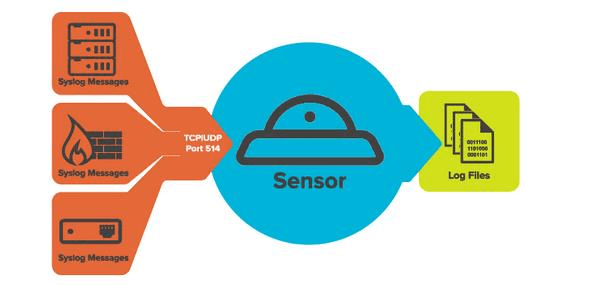
From the picture above, we can see, that log messages will be forwarded to the OSSIM with syslog via TCP/UDP connection on port 514. The OSSIM sensor will received all log messages forwarded from log sources, and normalized to human readable format like we can see on the picture bellow :
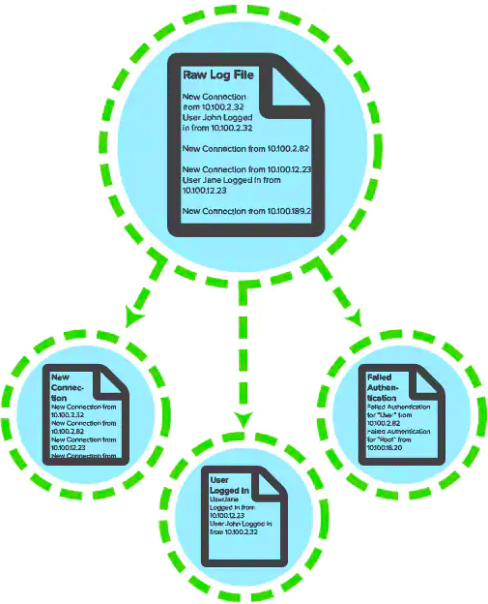
All logs messages forwarded to OSSIM via syslog, will be handled by Rsyslog to routing logs messages based on device ip or identifier from logs messages and located to /var/log directory. OSSIM agent used file configuration that consists of rules and regex called plugin to handle log normalization for databased stored.
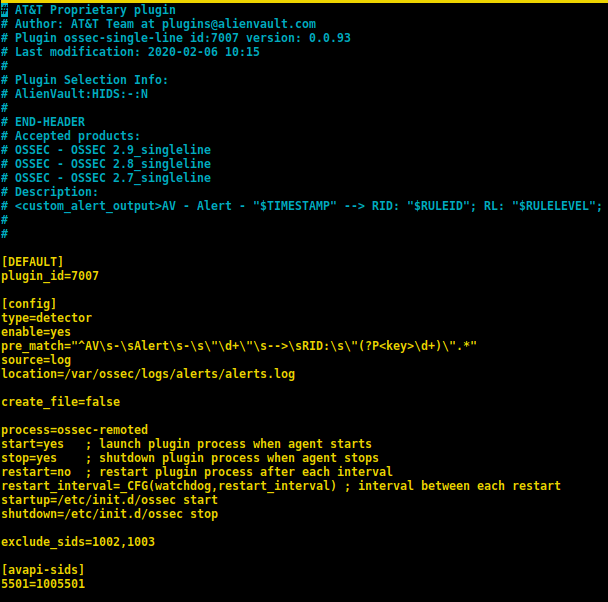
Sample from ossec-single-line plugin on OSSIM.
You can visit the official website from Alienvault to get more detailed about Alienvault SIEM features, and download the documentation from USM Alienvault Appliance for deployment Alienvault SIEM OSSIM.
Happy learning………..
 blackboot03.art.blog
Leave a comment